Delete users
IMPORTANT: Only the Administrator of your Innovation Cloud can delete users.
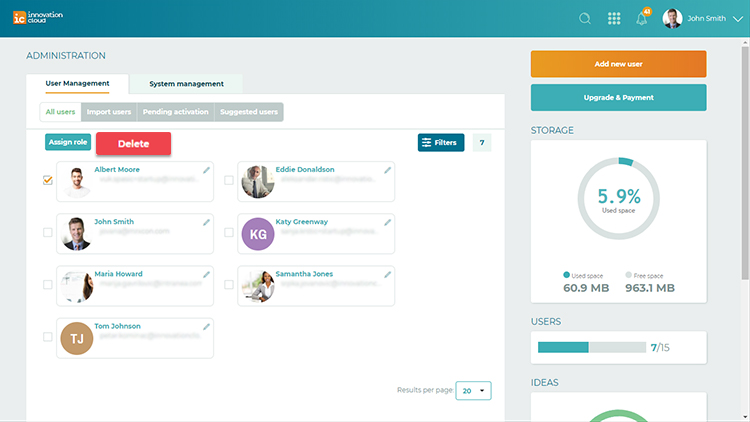
To delete a user, please go to the System settings > User Management - an overview of all active users on the platform.
Mark checkboxes beside users you want to delete and activate the red Delete button on the top of the user list. By taking this action user account will be terminated.
Related Articles
Suspend users
IMPORTANT: Only the Administrator of your Innovation Cloud can suspend users. To suspend a user, please go to the System settings > User Management. Locate the user you want to suspend and click on the pencil located on the upper right corner of the ...Apply roles to users
Innovation Cloud Startup account has only two roles. Admin role and Contributor role. The Administratorof the Innovation Cloud Startup account has access to all functionalities of the platform. The Administrator can manage users, Idea Folders and ...Add and import users
Let your people be part of your innovation process as well as part of your solution. Add new users to collect ideas and improve collaboration. Your users can contribute with their ideas, knowledge, opinions and expertise to your innovation process. ...Remove roles from users
IMPORTANT: Only the Administrator of your Innovation Cloud account can remove roles. Each user can carry only one role. To Remove a role from a user, please go to the the System settings option > User management. The list of all the active users will ...Delete idea
When it comes to managing ideas on Innovation Cloud, we strongly discourage from deleting them, since this action will permanently delete all data associated with the ideas, such as comments, likes, documents and scoring results. If the idea ...