Change administrator
IMPORTANT: Only the Administrator of your Innovation Cloud account can remove roles and choose a new Administrator. Each user can be set with only one role.
To set the Administrator role, please go to the System settings > User management tab.
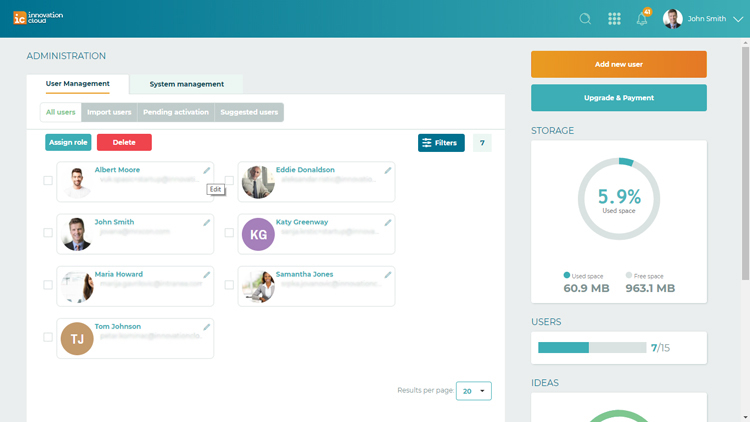
Select the user you want to assign an Administrator role to and click on the pencil located on the right side of the each userbox. In the user information page, select an Administrator role and Save changes.
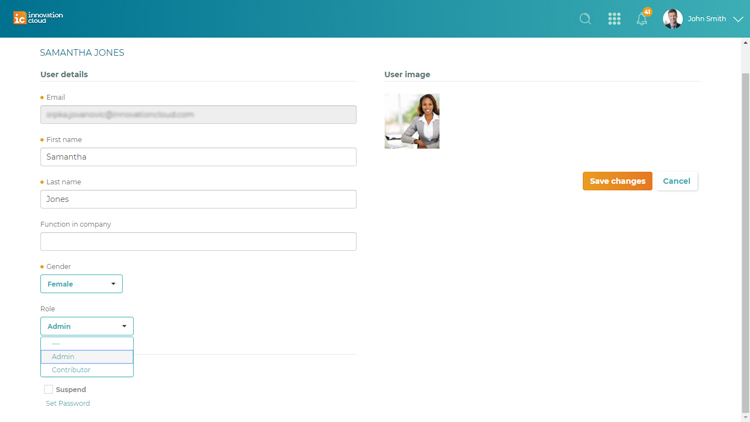
Note: Users can be set with only one role, so replacing that role with a new one, gives the user different access.
Related Articles
Setting up your domain
IMPORTANT: Only the Administrator of your Innovation Cloud Startup environment have access to the System settings options. To configure system details: 1. Click on your name in the upper right corner of the screen and from the drop-down menu choose ...Actions on idea
The action buttons enable you to change the status of an idea, to progress and develop an idea, and finally to make the decision on implementation of the idea. When the idea is created and improved through collaboration, the only action Idea ...Close Idea Folders
IMPORTANT: Only the Administrator of the Innovation Cloud account has the right to start or close Idea Folders. To Close Idea Folder: 1. Left navigation menu > Idea Folders 2. After you enter the desired Idea Folder, click on the pencil in the upper ...Edit user details
IMPORTANT: Only the Administrator of your Innovation Cloud can edit users. To edit user details, please go to the System settings > User management tab - an overview of all active users on the platform. To Edit user details click on the pencil ...Suspend users
IMPORTANT: Only the Administrator of your Innovation Cloud can suspend users. To suspend a user, please go to the System settings > User Management. Locate the user you want to suspend and click on the pencil located on the upper right corner of the ...